In the field of international trade and import and export, MNF (Manifest) plays an important role in ensuring goods are cleared through customs smoothly. So what is MNF?? How to declare MNF correctly? Let's go together Logistics power Explore details through the article below, includes definition, Meaning and step-by-step instructions for declaring MNF.
Article Content
What is MNF?
MNF (Manifest) is a system for receiving goods declarations, papers and documents related to the shipment, Used to carry out customs clearance procedures for incoming and outgoing ships. When the shipment is about to arrive at the destination port, Shipping company will send Notification of goods arrival (Arrival Notice) Attach the MNF declaration file number to relevant parties, including forwarding agent, consignor (shipper), and consignee (consignee).
The MNF declaration includes important information such as:
-
Main bill of lading number (Master Bill of Lading – MB/L) and MB/L release date.
-
Secondary bill of lading number (House Bill of Lading – HB/L) and HB/L release date.
-
Information about the sender (shipper) and recipient (consignee).
-
Loading port, unloading port, queuing point, delivery point.
-
Goods details: quantity, weight, package type (container, retail goods, bulk cargo).
-
Shipping method: CFS/CFS (retail goods) or CY/CY (container goods).
The MNF declaration is made by the shipping company (for MB/L) or forwarding agent (for HB/L). When the recipient comes to pick up the goods, The customs authority will compare the information on the customs declaration with the information in the MNF. If the information matches, Goods will be delivered; if there are any errors, Customs clearance process may be delayed. Therefore, Declaring MNF requires absolute care and accuracy.
In addition to MNF for container goods, There are also other types of MNF such as MNF for bulk cargo, liquid, or non-cargo vehicle.

Meaning of declaring MNF
MNF serves as a core document for customs authorities to check and compare shipment information. Specifically:
-
For exporters: Shipper provides bill of lading information to shipping lines or forwarding units (forwarder) to prepare MNF.
-
For shipping lines and forwarders: The shipping line declares MNF for the Master Bill of Lading (MB/L), while the forwarder declares MNF for the House Bill of Lading (HB/L).
-
For customs: MNF is used for comparison with customs declarations and delivery orders (Delivery Order – D/O). If the information matches, The goods will be cleared through customs and delivered to the recipient.
Correct MNF declaration helps:
-
Ensure the customs clearance process takes place quickly, avoid delay.
-
Minimize the risk of incurring correction costs or having goods held.
-
Increase reliability and professionalism in international logistics activities.
Steps to declare MNF
To declare MNF accurately and effectively, Businesses need to take the following steps. In Vietnam, MNF declaration is done through National Single Window System (https://vnsw.gov.vn/), also known as electronic MNF, helps save time and reduce errors.
Contents to prepare when declaring MNF
Before declaring, Enterprises need to prepare the following documents and information:
-
Declaration List: List of system standard data, not edited, delete or change.
-
House Bill of Lading (HB/L): Additional bill of lading information, by the delivery unit (forwarder) declare.
-
Goods Declaration: Detailed declaration information about goods (type of goods, quantity, weight).
-
General Declaration: General train manifest.
-
Passenger List: Passenger list (if any).
-
Empty Container: List of empty containers (if applicable).
-
Crew List: List of crew members on board.
-
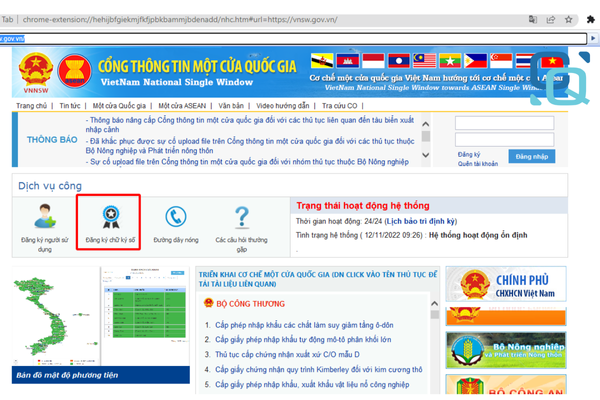
Detailed instructions on the steps to declare MNF 2026 Dangerous Goods Manifest: List of dangerous items (if any).
Instructions for declaring MNF on the National Single Window System
-
Step 1: Notice of transfer of right to declare bill of lading
-
Contact the shipping company or LCL unit (retail goods) to be authorized to declare the bill of lading. If you do not have the right to declare, Only MB/L declared by shipping line, and the goods will not be handled properly according to HB/L.
-
-
Step 2: Login to the National Single Window System
-
Visit the website https://vnsw.gov.vn/ and log in with your business account.
-
-
Step 3: Access the license management section
-
Go to section Ministry of Transport > Maritime Department > License Management.
-
-
Step 4: Enter shipping profile information
-
At the interface "Manage incoming and outgoing shipping documents", Completely fill out all required information fields (bill of lading number, loading/unloading port, goods information, v.v.) and press Update.
-
-
Step 5: Detailed declaration of goods
-
Select the “+” icon to add information about the goods, Includes container number, seal number, weight, and volume.
-
Instructions for declaring MNF via Excel file
Declaring MNF via Excel file is a popular method, Simple and less prone to errors. Implementation steps include::
-
Step 1: Notice of transfer of right to declare bill of lading
-
Similar to step 1 above, Contact the shipping company or LCL unit for authorization.
-
-
Step 2: Enter information into Excel file
-
Prepare an Excel file with information columns such as bill of lading number, Shipper/consignee information, loading/unloading port, weight, number of bales, and other details according to the prescribed form.
-
-
Step 3: Login to the National Single Window System
-
Visit https://vnsw.gov.vn/ and log in to your account.
-
-
Step 4: Access the electronic declaration section
-
Go to section Ministry of Transport > Maritime Department > Manage Licensing Records > Select the declaration profile code > Right click and select Electronic declaration > Bill of lading.
-
-
Step 5: Upload Excel file to the system
-
At the MNF declaration interface, Select the Excel file prepared in step 2, then press Enter. The system will automatically retrieve information from the Excel file to complete the declaration.
-
Steps to edit MNF
Common errors when declaring MNF
Declaring MNF seems simple but errors can easily occur if not careful. Some common errors include:
-
Misspelling in bill of lading number or shipper/consignee information.
-
Confused container information (container number, seal number).
-
Wrong declaration of shipping method (CFS/CFS hoặc CY/CY).
-
Wrong or missing weight information, number of packages.
-
Confused loading/unloading port or destination, Usually due to copying from old Excel files.
-
Incorrect use of decimal point (For example: confused between “.” and ",”).
These errors can lead to goods being detained at the port, causing costly editing costs and time.
MNF editing process
To edit MNF when errors occur, The declarant needs to take the following steps:
-
Step 1: Editing on the National Single Window System
-
Visit https://vnsw.gov.vn/, Select the record code of the shipment to be edited.
-
Update new information and click Edit request, then push the profile away.
-
-
Step 2: Prepare documents to send to customs authorities
-
Official letter requesting correction: Clearly state the reason and content of the correction.
-
Email: From agent or shipper request MNF correction.
-
Master Bill of Lading (MB/L) or House Bill of Lading (HB/L): Provide a copy of the relevant bill of lading.
-
-
Step 3: Submit documents to customs
-
Submit documents to customs authorities for review and approval. After customs acceptance, MNF editing is complete.
-
Note: Editing MNF takes time and effort, Therefore, declarants need to check carefully before submitting to limit errors.
Benefits when using Cuong Quoc Logistics's services
Cuong Quoc Logistics not only provides international shipping services but also supports customers in MNF declaration procedures, include:
-
In-depth consulting: Support in preparing documents and declaring MNF accurately, avoid errors.
-
Quick processing: A team of experienced experts helps complete customs procedures in a short time.
-
Supports MNF editing: Guide and represent customers in handling error cases.
Conclude
MNF is an indispensable part of the international goods transportation and customs clearance process. Accurate MNF declaration helps ensure goods are delivered on time and avoids additional costs. Hope this article from Logistics power provided useful information about MNF and how to make effective declarations.
Contact us immediately for support:
Contact information
Cuong Quoc Freight Forwarding Company Limited
Office: 7th floor, Parami Building, 140 Bach Dang, Tan Son Hoa Ward, Ho Chi Minh City
Hotline: 0972 66 71 66
Email: info@cql.com.vn
Website: https://cql.com.vn/

See more at